Full apps.
Zero BS.
ZeroBS Apps doesn’t collect your work records or track you.
Practical tools for construction calculations and work records. Buy once, without the bloat.
Choose your appPaid Android apps · One-time purchase · US only

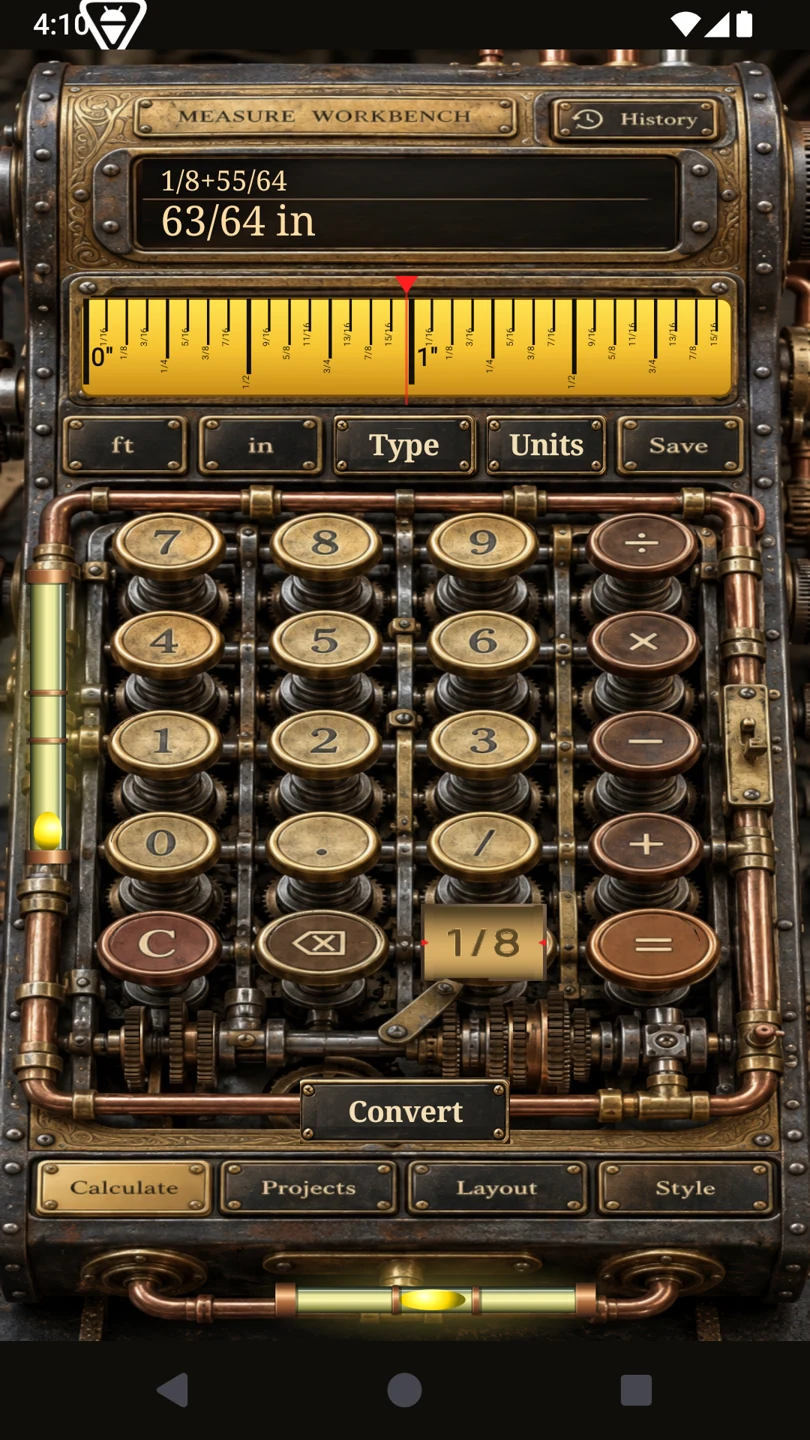
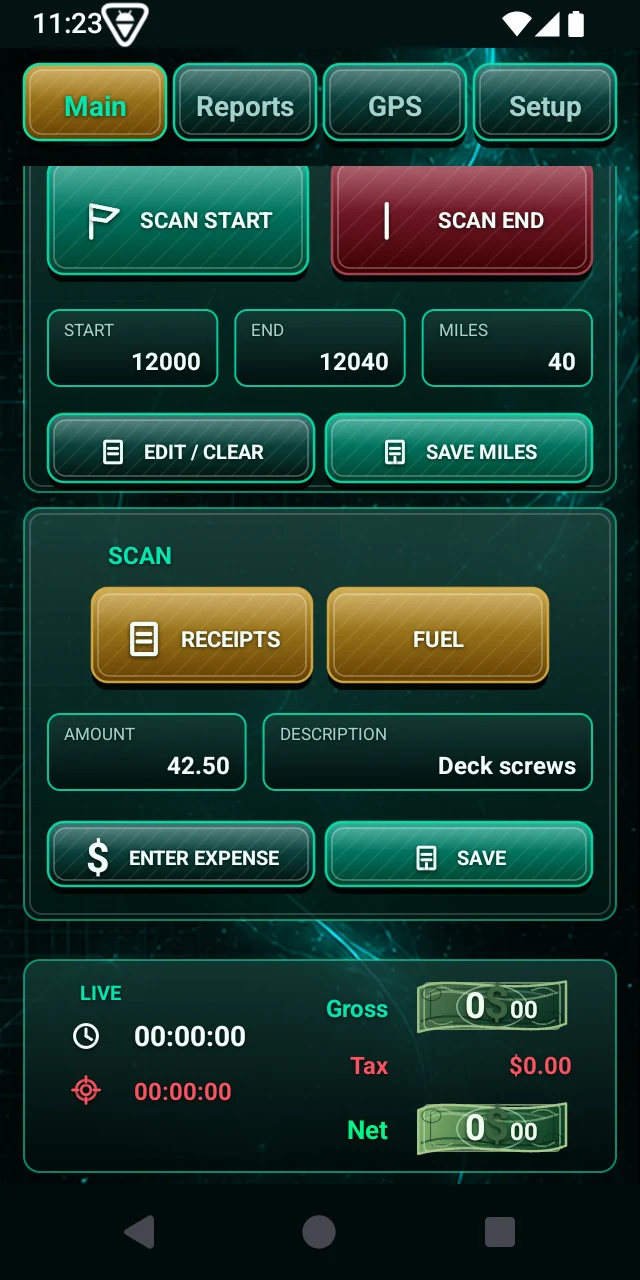
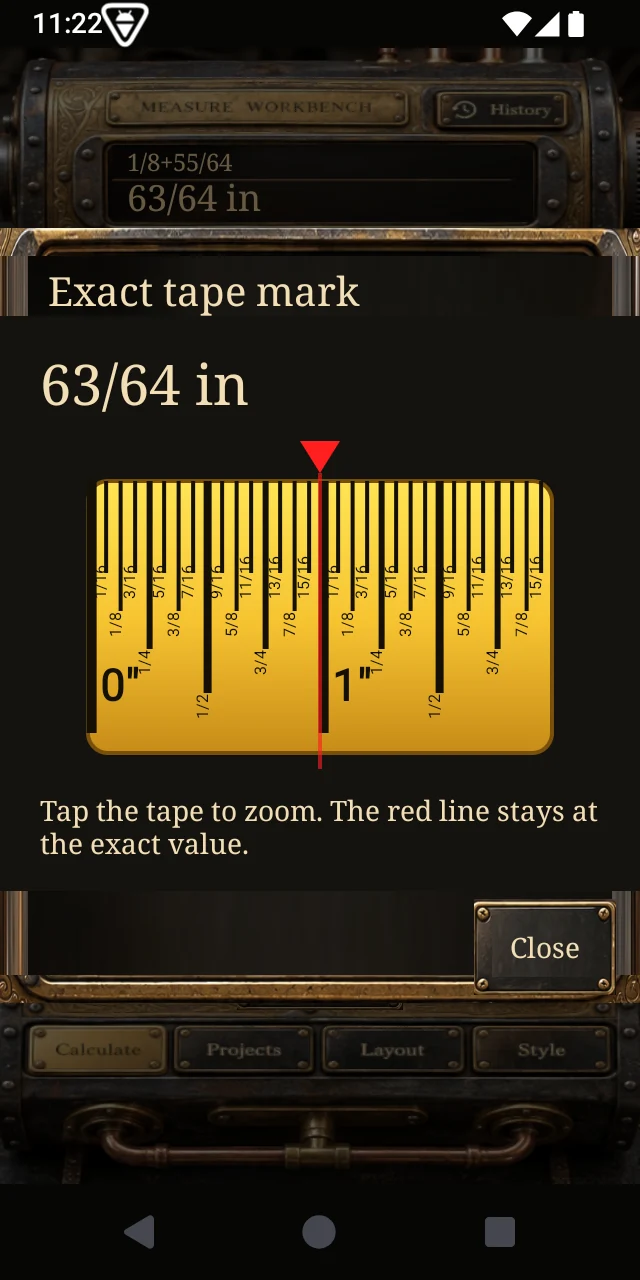
Calculate it. See the mark. Make the cut.
Measure
Workbench
Your tape measure, construction calculator and project tools in one place. Find the exact mark, work through a layout and keep the cut list with the job.
- Exact fractions and a tape you can zoom.
- Stairs, roofs, walls, geometry and material takeoffs.
- Projects, stock planning, cut lists and a bubble level.
Four steps to Measure Workbench
Use the same US Google account throughout. Group membership covers both apps; each app needs its own tester opt-in.
- 1. Join groupCurrent step
- 2. Become testerNext
- 3. Buy on Google PlayNext
- 4. InstallNext
Join the ZeroBS Apps group
Opens another tab. On Google, choose Join group. Then switch back to the ZeroBS Apps tab and select I’m in the group below.
Join Google GroupAlready a member? You can confirm below without joining again. Google handles signup; this website does not collect your email.
Become a tester for Measure Workbench
Opens another tab. On Google Play, choose Become a tester. Then switch back to the ZeroBS Apps tab and select I’m a tester for this app.
Become a tester for Measure WorkbenchAlready opted in to this app? Confirm below. Joining the group alone does not complete this step.
Buy on Google Play
Your group and tester steps are confirmed. You can buy the app below.
Google Play opens another tab. Complete the redemption or purchase there, then switch back to the ZeroBS Apps tab to confirm and move to installation.
After completing your purchase on Google Play, confirm below. Opening the store alone does not buy the app.
Install Measure Workbench
Redemption or purchase and installation are separate. Open the app listing, then choose Install with the same Google account.
Opens another tab, or the Google Play app on your phone. After installing, you can switch back to the ZeroBS Apps tab and confirm below.
Install Measure Workbench on Google PlayThis page uses your confirmations; it cannot verify your Google membership, redemption or purchase. If Play says unavailable, check the same US account is used for the group, tester opt-in and Play. Try the app, stay opted in for at least 14 consecutive days, and send feedback through the group.
US test release. Buying also requires joining the group and opting in to this app.
Checking promo availability…
Full app either way. US only. Google Play confirms final price and tax.A whole workbench. In your pocket.
Start with the tape. Keep going through the tools that take a job from measurement to cut list.
Choose any category to see it.
Put the answer on the tape.
A fraction is easier to use when you can see exactly where it lands. Open a calculated or saved length on the tape and tap to zoom in on the mark.
- Feet, inches and exact fractions
- Tap-to-zoom tape with an exact position marker
- Tape access from calculations, measurements and cut parts
Titan1099
Hours, mileage, receipts and expenses shouldn’t be scattered across your day. Give them a place in your pocket.
- Hours, mileage, GPS routes, receipts and fuel.
- Statements, tips, jobs and vehicles.
- Local records, PDF reports and complete backups.
Four steps to Titan1099
Use the same US Google account throughout. Group membership covers both apps; each app needs its own tester opt-in.
- 1. Join groupCurrent step
- 2. Become testerNext
- 3. Buy on Google PlayNext
- 4. InstallNext
Join the ZeroBS Apps group
Opens another tab. On Google, choose Join group. Then switch back to the ZeroBS Apps tab and select I’m in the group below.
Join Google GroupAlready a member? You can confirm below without joining again. Google handles signup; this website does not collect your email.
Become a tester for Titan1099
Opens another tab. On Google Play, choose Become a tester. Then switch back to the ZeroBS Apps tab and select I’m a tester for this app.
Become a tester for Titan1099Already opted in to this app? Confirm below. Joining the group alone does not complete this step.
Buy on Google Play
Your group and tester steps are confirmed. You can buy the app below.
Google Play opens another tab. Complete the redemption or purchase there, then switch back to the ZeroBS Apps tab to confirm and move to installation.
After completing your purchase on Google Play, confirm below. Opening the store alone does not buy the app.
Install Titan1099
Redemption or purchase and installation are separate. Open the app listing, then choose Install with the same Google account.
Opens another tab, or the Google Play app on your phone. After installing, you can switch back to the ZeroBS Apps tab and confirm below.
Install Titan1099 on Google PlayThis page uses your confirmations; it cannot verify your Google membership, redemption or purchase. If Play says unavailable, check the same US account is used for the group, tester opt-in and Play. Try the app, stay opted in for at least 14 consecutive days, and send feedback through the group.
US test release. Buying also requires joining the group and opting in to this app.
Checking promo availability…
Full app either way. US only. Google Play confirms final price and tax.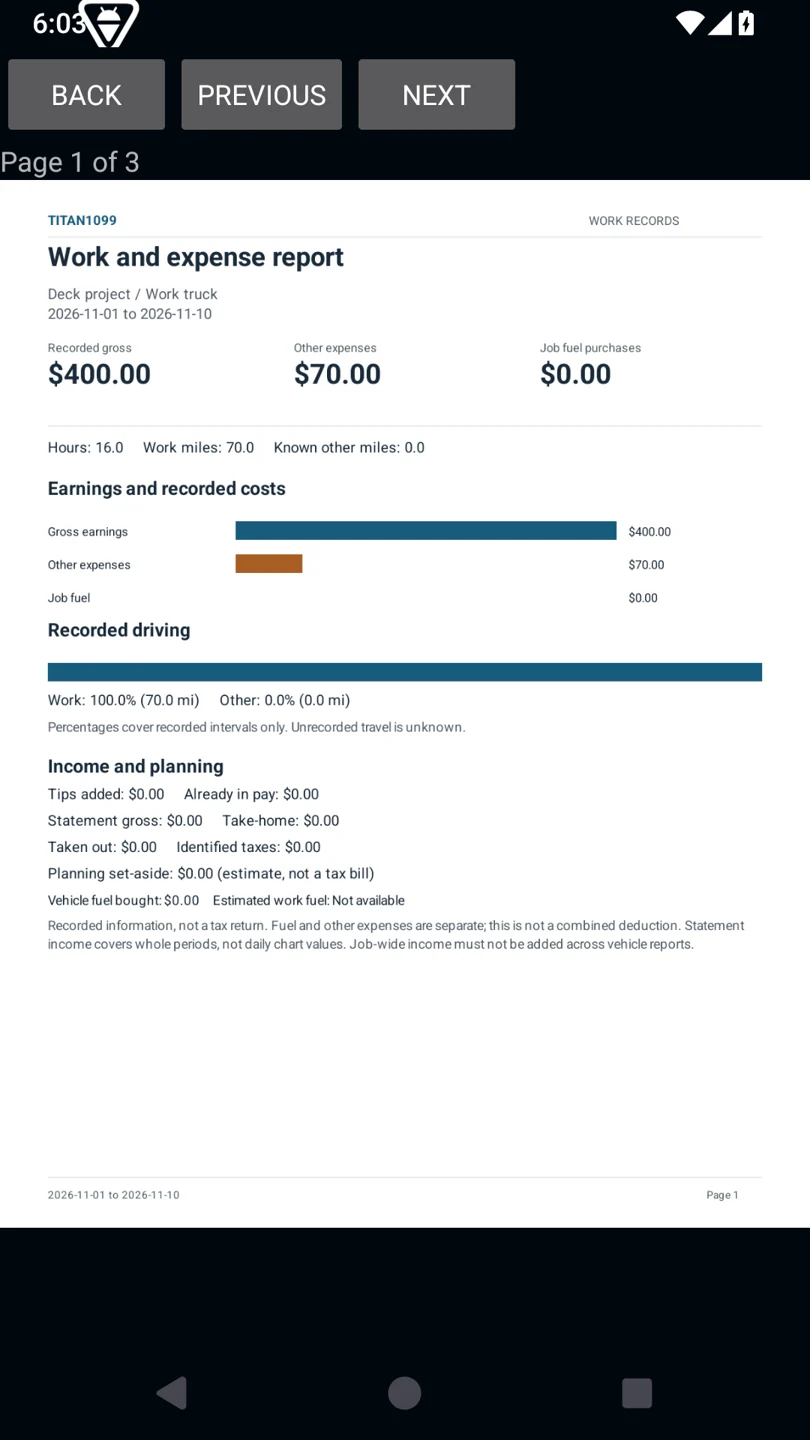
Record the work. Keep the detail. Export the report.
The whole workday. Kept together.
Hours, travel, purchases and earnings belong in one place. Explore the tools that keep them there.
Choose any category to see it.
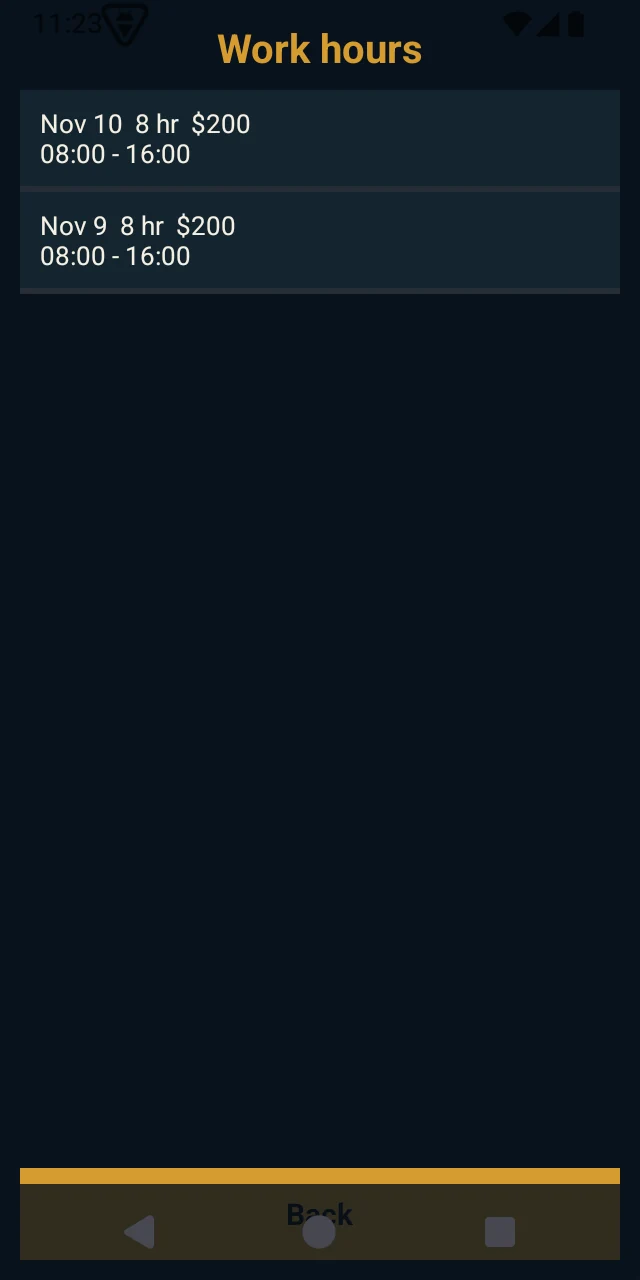
Keep the workday on record.
Track work hours against the selected job, with target-hour controls and pay-period records close at hand.
- Clock-in and clock-out controls
- Target-hour reminder controls
- Saved hours and pay-period history
Before you download.
Is the free copy a trial?
No. A valid launch code unlocks the full paid app. The deadline is for redeeming your code, not a timer on using the app.
What happens when the giveaway ends?
The apps remain available to buy at their regular US prices: Measure Workbench $9.99, Titan1099 $1.99. Each app’s free offer ends when its codes run out or its deadline passes.
How do I redeem a code?
Join the ZeroBS Apps Google Group and opt in to the US closed test. Get your promo code, confirm the free offer on Google Play, then install. Use the same Google Play account for every step.
How does this page remember my code?
An essential browser cookie remembers each app’s assigned code. Clearing it or switching browsers loses that association. Once assigned, a code is removed from the available pool and is never offered to another visitor. Reopening it returns your same code, not a new one. We keep its assignment to prevent reuse; an assigned code is not proof of Google redemption or installation. Google handles your purchase or redemption; see our privacy policy for third-party service details.